Migrated a table with 7.5+ million rows
Here is how i would do the migration if i were to do it again
I ran an ALTER TABLE on 7.5 million rows at night. it took 1089 seconds. here's what i learned.
- super tight deadline to migrate this ASAP
- ran a bunch of alter tables — drop a foreign key, add a new column, make 2-3 new indexes, make an existing column nullable
- all of this on a mysql RDS t4xlarge
- innodb
- 7.5 million rows
- Data_length ≈ 2.80 GB
- Index_length ≈ 0.86 GB
- Total ≈ 3.66 GB
i did it the "quick" way instead of the "right" way. this post is about the right way.
that night
the exact command i ran:
ALTER TABLE <the_table_name>
MODIFY doctor_oid VARCHAR(30) NULL,
ALGORITHM = INPLACE,
LOCK = NONE;
INSTANT was not supported for this kind of alter table. COPY i of course wouldnt have done. the only option left was INPLACE [given the tight deadline]
it took 1089 seconds. that's 18 minutes of watching a terminal, knowing that if something goes wrong — a lock escalation, a timeout, a crash — your production table is in the middle of a rebuild and you're F'ed.
i was like "F so many things could have gone wrong". once the ORGs timeline was done, i needed to deep dive. what was the actual right way of doing it?
luckily
- there was no lock
- writes and updates kept happening
- the PEAK CPU was at 36 [point] some percent
- but those 1000 seconds were terrifying and hence i went down the rabbit hole of "okay whats the right way" [opinionated and in most cases]
first, understand the 3 ALTER TABLE algorithms
COPY, INPLACE, INSTANT — quick TLDR;
1. COPY (rebuild table)
- The database creates a full copy of your table with the new structure.
- Then it inserts all the old rows into the new table.
- Swaps the old table with the new table.
- Works for everything.
- Very slow, needs double storage.
2. INSTANT
- Only changes metadata (like adding a nullable column at the end).
- Super fast, almost zero overhead.
- Limited: can't change column types, drop columns, or modify indexes.
3. INPLACE
This is the trickiest and most interesting.
Idea: Modify the table without copying the whole table, but still touch the actual data if needed.
How it works:
- Online DML: Instead of making a copy of the whole table, Inplace can rewrite only the affected parts.
- Example: Adding an index can build the index while reading rows directly from the existing table.
- Minimal locking: Often the table can still be read and written during the operation.
- Algorithm-dependent:
- Adding a new column that isn't computed → might be INPLACE (just updates metadata + fills default values lazily).
- Changing a column type → INPLACE may rewrite just that column, not the entire row.
- Dropping an index → INPLACE just removes the index structure, rows untouched.
Why it's better than COPY:
- Uses less disk space (doesn't duplicate the entire table).
- Usually faster, especially for big tables.
- Can sometimes run online, allowing reads/writes.
Why it's not always "instant":
- Unlike INSTANT, it might still touch the rows to update data structures (like filling defaults, recalculating columns, or rebuilding indexes).
Analogy:
- COPY: Tear down the house, build a new one brick by brick.
- INPLACE: Renovate the house while people are living in it, only replacing what needs fixing.
- INSTANT: Just change the address on the mailbox — nothing else moves.
what is bin-log [TLDR;]
When a transaction is executed in MySQL, the changes it makes are captured in the binlog file. Every operation in a transaction — whether it's a data insert, update, or delete — is logged in sequence. Each transaction is assigned a unique log position, which allows MySQL to track its progress, making it easy to replicate transactions on slave servers or recover the database to a specific point in time.
For example, if you run the following SQL query:
UPDATE users SET status = 'active' WHERE last_login > '2024-01-01';
This query would be logged in the binlog file, and it would contain information about the update operation, such as the table affected, the condition (last_login > '2024-01-01'), and the new value ('active').
Binlog files are sequential in nature. New events are appended to the end of the file, creating a continuous log of all changes. When the file reaches a predefined size, MySQL rotates it, creating a new binlog file and allowing for more efficient management.
you need to understand binlog because ghost relies on it heavily. keep reading.
the right way: just Freaking use GHOST :)
gh-ost — GitHub's Online Schema Transmogrifier.
here's the problem with alter table → when you run it, you're changing the data live on your live table. massive time, locks[chances of happening].
here's what ghost does instead:
firstly:-
- has a plethora of flags —
min_threads,max_thread,batch_size,sleep,chunk-size,throttle-control-replicasetc. - GHOST WOULD ALWAYS NEED A P-KEY because internally it uses the P-KEY as its cursor, and for various other reasons
- the moment you run the ghost command it starts making a shadow / ghost table of your original table with all the flags and uses bin-log streaming, with whatever batch / sleep you specify
- once that is done it REPLACES YOUR ORIGINAL TABLE WITH ITS MADE TABLE [milliseconds ops]
- best part — bin log files upon reaching a specific size, mysql internally rotates it. ghost handles that too. have a log for this when i ran it on 7.5mil rows
let that sink in. your original table? never touched.
basically:
- Does NOT touch your main table directly
- Creates a ghost table
- Builds the index there safely [ with whatever changes you specified / intend to do ]
- Slowly copies data in background
- Syncs ongoing changes via binlog
- Swaps tables at the end (milliseconds)
and the swap? ghost simply does this:
RENAME TABLE original TO original_old, ghost TO original;
near-instantaneous. zero downtime.
Should you use ghost always?
Umm, try INSTANT first. always.
ALTER TABLE doctors
MODIFY col5 VARCHAR(30) NULL,
ALGORITHM=INSTANT;
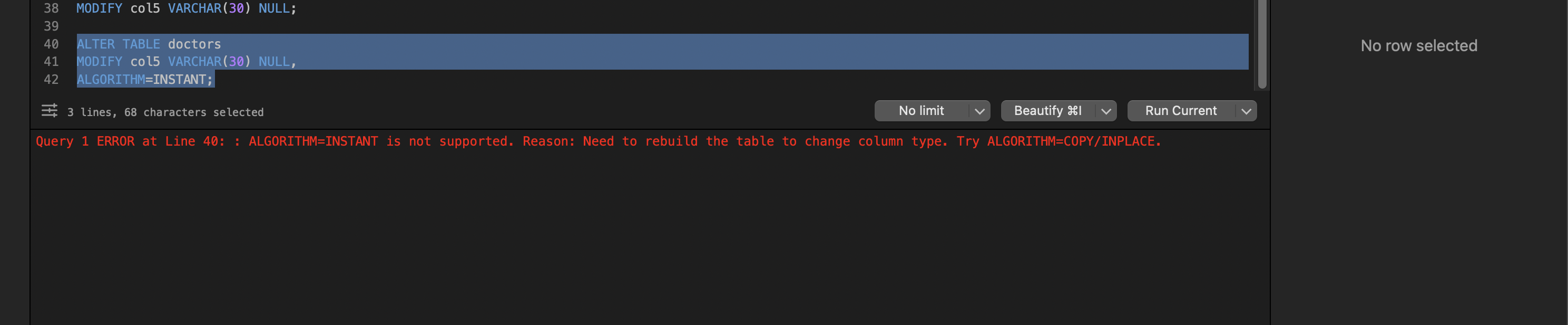
if mysql throws an error saying instant is not supported — that error is your sign to use ghost.
before running any ALTER, ask yourself one question:
"Will MySQL need to touch every row?"
If YES → rebuild → slow → use ghost
If NO → instant → you're good
how ghost actually works internally [my understanding]
the above should have made its approach clear — it never touches your table directly. but lets go deeper with this diagram:
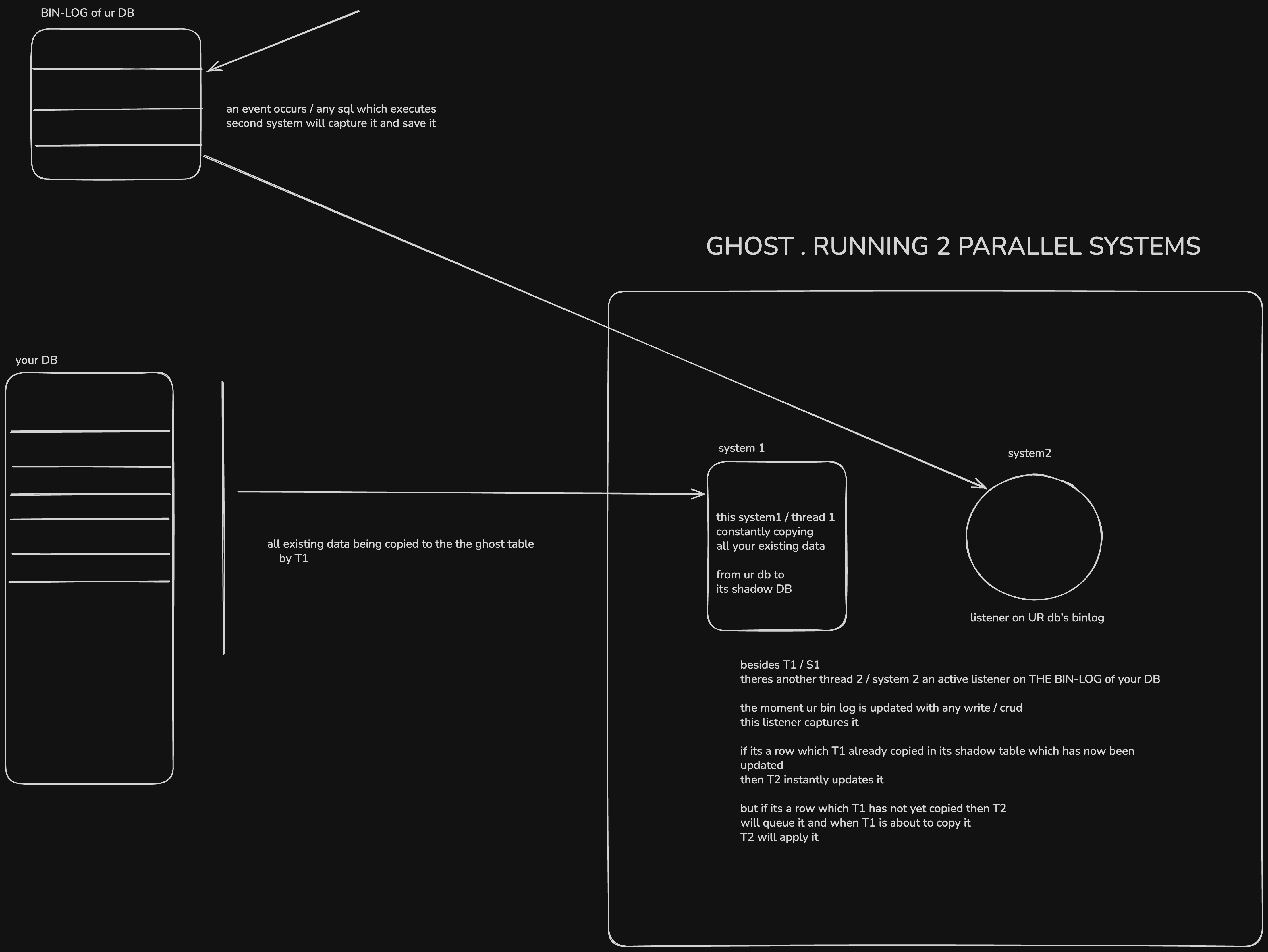
TLDR;
- 1st system the bulk syncer / copy mechanism replicating the data from your prod table its shadown table
- 2nd system the listener on the Bin-log of your table > any change? queue it
CRITICAL SAFETY GUARANTEE
before the final swap, gh-ost ensures:
Backlog == 0
meaning:
ghost table is 100% in sync
the cutover (final step)
RENAME TABLE doctors → _doctors_old
RENAME TABLE _doctors_gho → doctors
instant. no data loss.
but what if the swap happened and you realize the migration was wrong?
This is the one people worry about most. After cutover, gh-ost does:
RENAME TABLE your_table TO _your_table_del,
             _your_table_gho TO your_table;
Notice: your old table isn't deleted — it's renamed to _your_table_del. So your rollback is:
RENAME TABLE your_table TO _your_table_gho,
             _your_table_del TO your_table;
That's instant. You're back to the old schema. But — any writes that happened after the cutover to the new table structure are now in _your_table_gho and won't be in your rolled-back table. So the faster you catch the issue, the less data reconciliation you need. In practice, keep the _del table around for a few hours/days before dropping it.
The key thing to internalize: gh-ost never touches your original table's data. Every failure scenario before the final cutover means your original table is sitting there, completely untouched, as if nothing happened.
Scenario 1: gh-ost dies at 50% copy (process crash, OOM, you Ctrl+C, network blip)
Nothing happens to your original table. The ghost table (_your_table_gho) is sitting there half-filled. You just clean up and retry:
DROP TABLE IF EXISTS _your_table_gho;
DROP TABLE IF EXISTS _your_table_ghc;  -- the changelog table gh-ost uses
Then rerun. gh-ost starts fresh. Your app never noticed anything.
Scenario 2: gh-ost finishes copying but hasn't cut over yet
If you're running with --postpone-cut-over-flag-file, gh-ost will complete the copy, get backlog to 0, and then just wait for you to remove the flag file. This is your window to inspect the ghost table, run sanity checks:
SELECT COUNT(*) FROM _your_table_gho;
SELECT COUNT(*) FROM your_table;
-- these should match
If something looks wrong, just kill gh-ost. Original table untouched.
not every ALTER TABLE is slow though
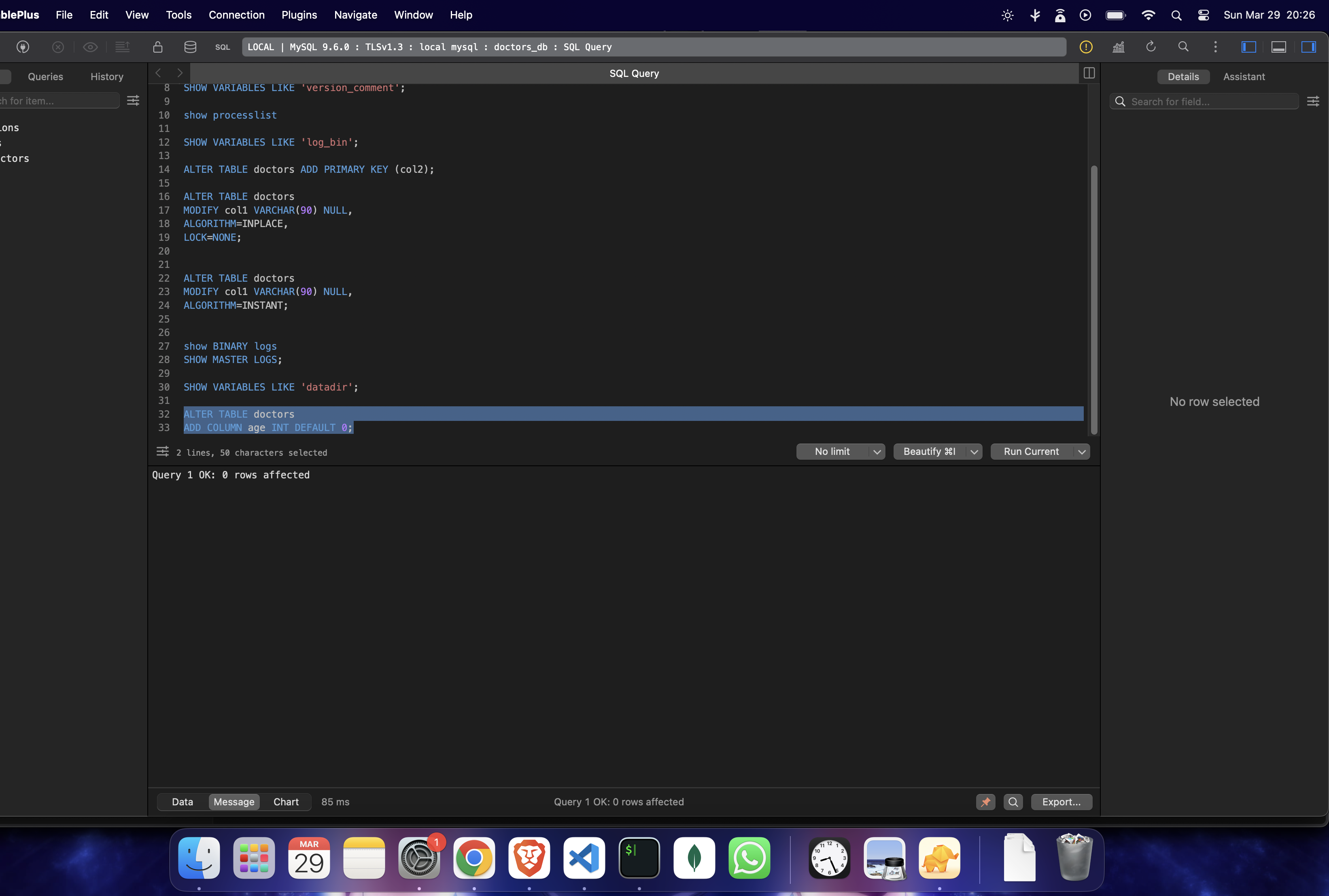
a simple alter table where you add a column with a default value — even on 7 MILLION rows — takes only 86 ms
this has 7.5 million rows:
but alter tables that involve:
- schema changes
- dropping something
those do take time.
ALTER TABLE doctors ADD PRIMARY KEY (col1);- took 25s on 7.5m rows table
LIVE EXPERIMENT — whatever happened that night, [ I had to replicate ]
7.5 million rows. making col3 nullable as no, means there can't be any null value in it.
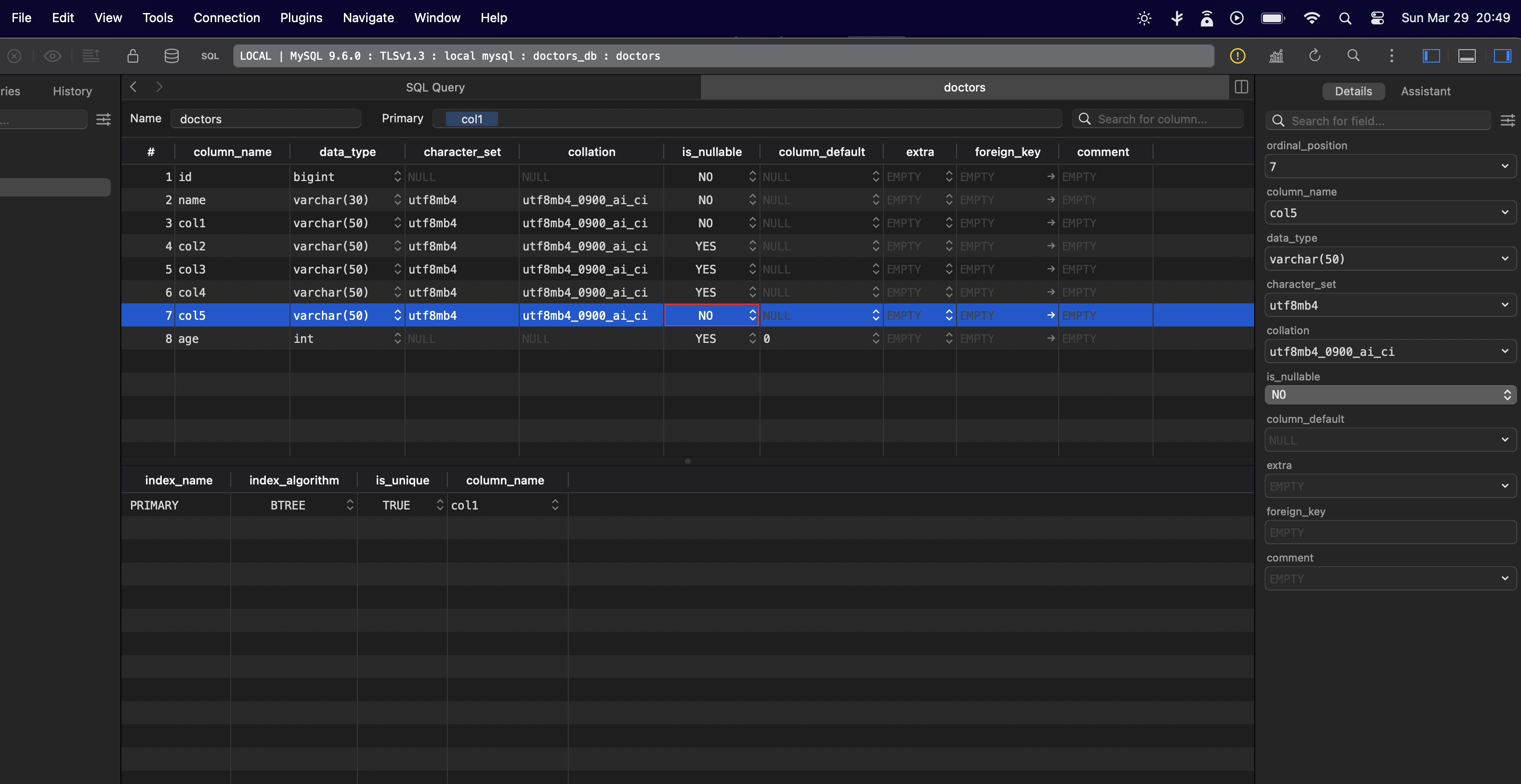
the exact ghost command i ran:
 gh-ost \
--host=127.0.0.1 \
--port=3306 \
--user=root \
--database=doctors_db \
--table=doctors \
--alter="MODIFY col3 VARCHAR(50) NOT NULL" \
--allow-on-master \
--execute \
--chunk-size=5000 \
--max-load=Threads_running=8 \
--critical-load=Threads_running=20 \
--initially-drop-ghost-table \
--initially-drop-old-table \
--exact-rowcount \
--verbose
it started running →
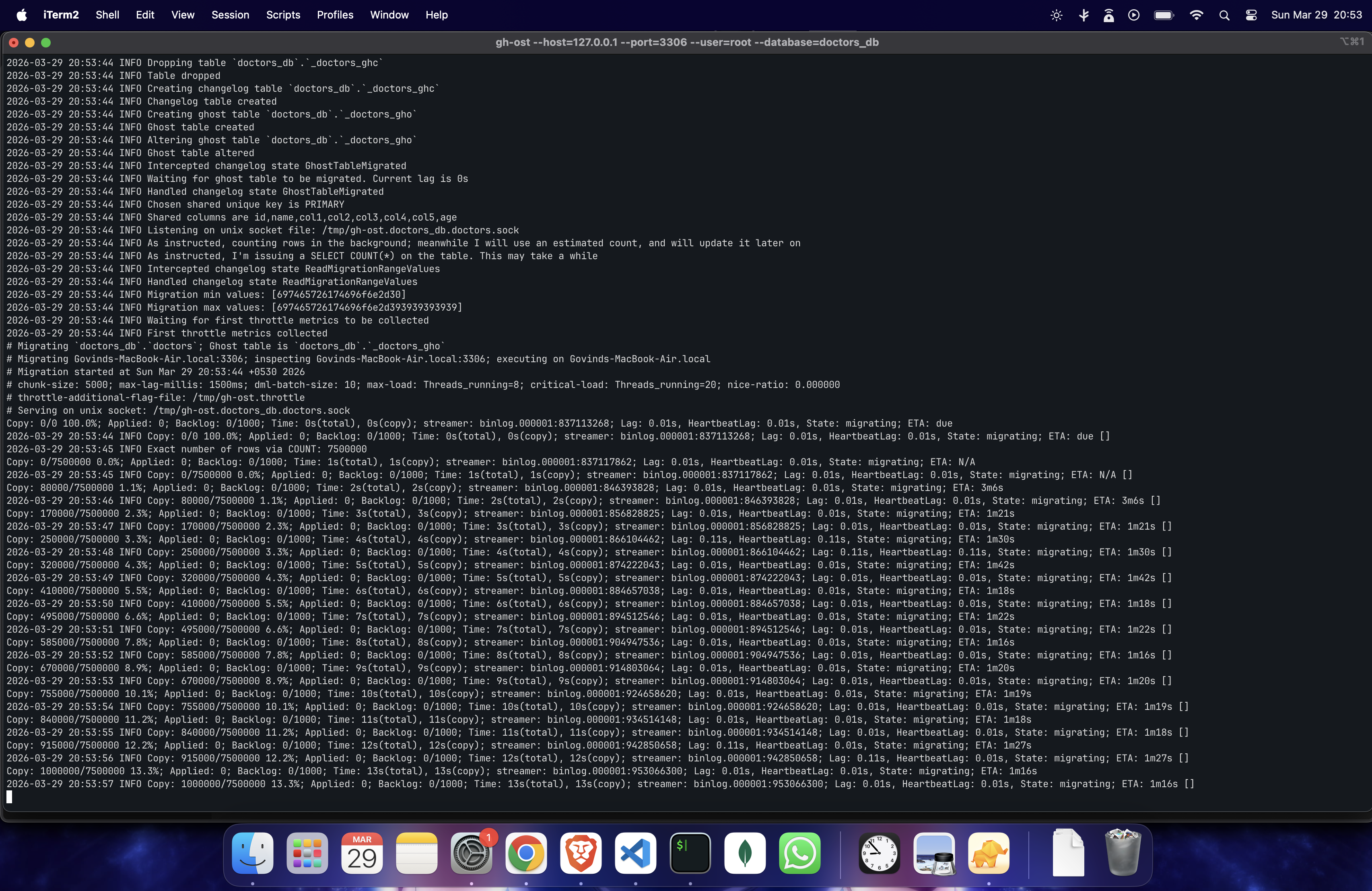
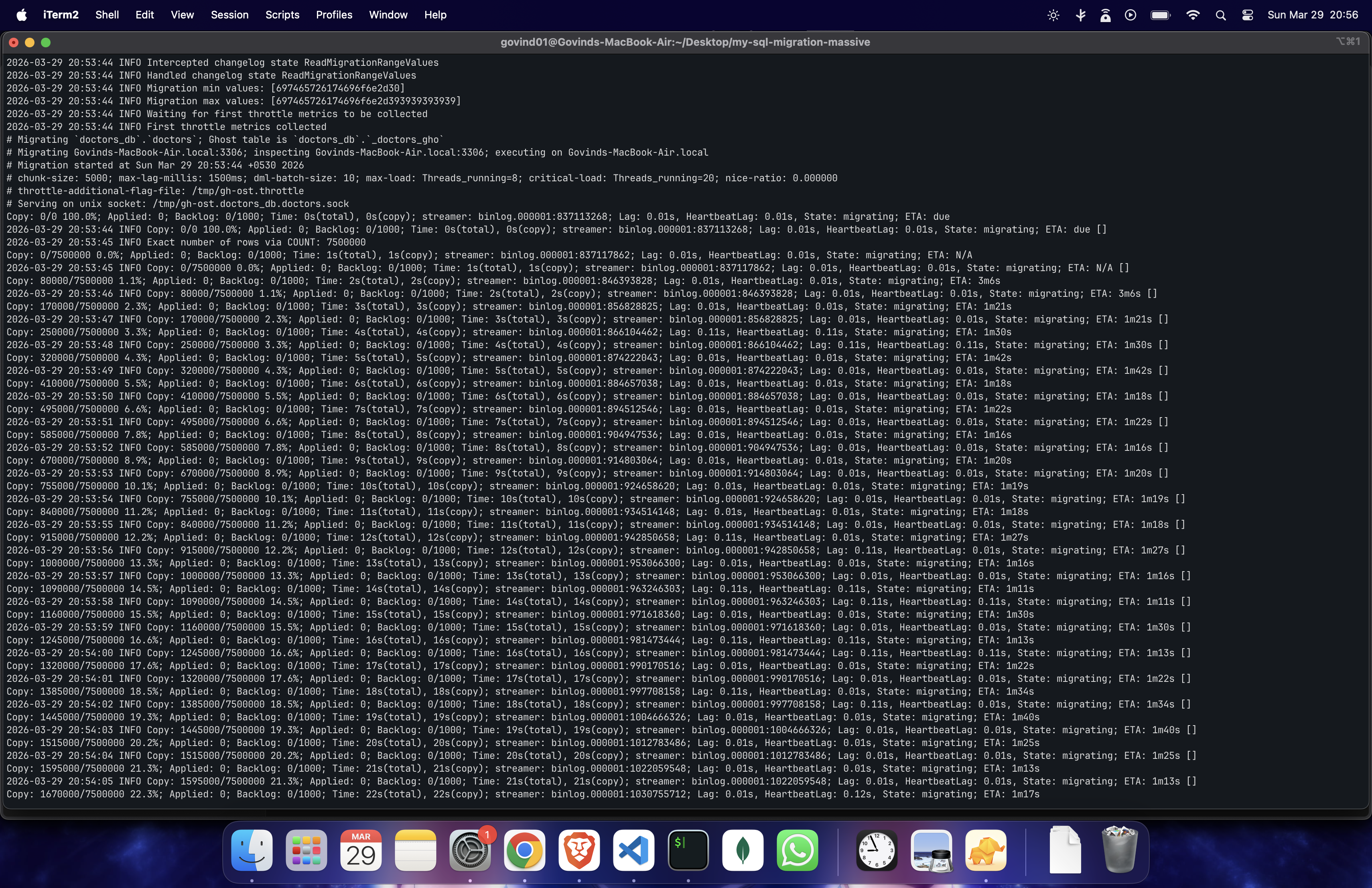
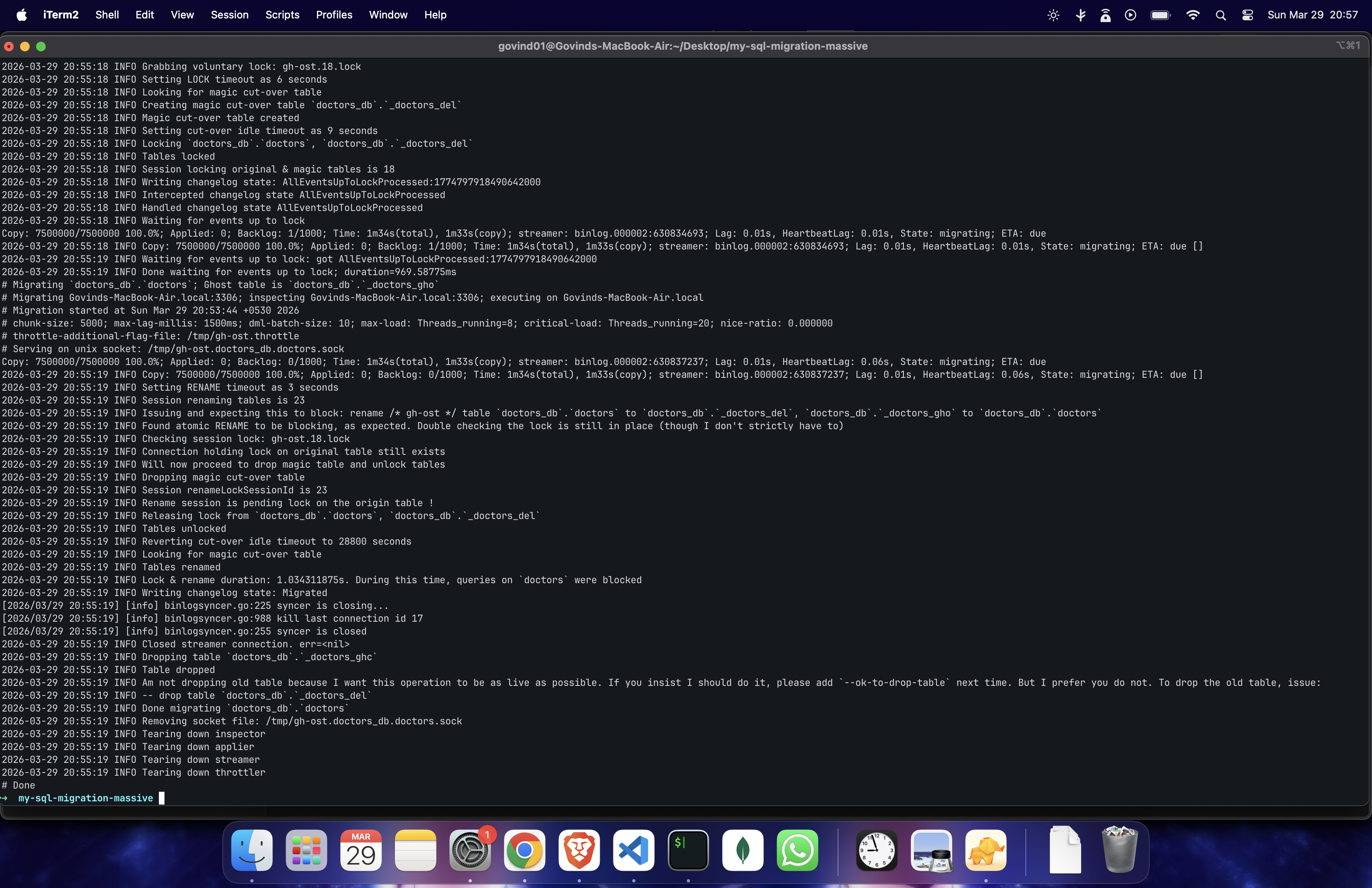
full logs: Github-Jist
the result:
~7.5M rows in ~1m15s
~100k rows/sec
i still remember that night — mysql ALTER TABLE took 1089 seconds. that's 17+ minutes of staring at a terminal, sweating.
ghost did the same thing in 1 minute 15 seconds.
17 minutes vs 1 minute. same table. same data. same change.
SOME NUANCE
- the test i did with ghost was all on my local 127.0.0, so of course no network latency taken into account
- this same ghost setup with an RDS could have taken 5-8 mins to be honest, still lesser than the original alter table + way more predictable
rough math:
Locally I hit ~100k rows/sec. On RDS, expect roughly 20-40k rows/sec with moderate settings (network overhead + conservative throttling). So:
7.5M rows ÷ 30k rows/sec = ~250s ≈ ~4 mins (aggressive) 7.5M rows ÷ 15k rows/sec = ~500s ≈ ~8 mins (moderate)
- ghost makes a full shadow table so make sure you have disk space. [Even alter table with Algorithm = COPY re-builds the whole table and even it needs the whole extra space on disk]. so its not really a tradeoff, IMO
here are some important commands i would keep handy the next time I run a migration:
- always check the version first
SELECT VERSION();
IMPORTANT COMMANDS "I" WOULD KEEP HANDY DURING MY NEXT MIGRATION
show table status like 'your-table-name'
check running tasks
show processlist
Check how far along an in-progress ALTER actually is (works for INPLACE alters):
SELECT EVENT_NAME, WORK_COMPLETED, WORK_ESTIMATED,
       ROUND((WORK_COMPLETED / WORK_ESTIMATED) * 100, 2) AS pct_done
FROM performance_schema.events_stages_current;
Check disk space before you start anything — gh-ost creates a full shadow table, so you need roughly 1x your table's size in free disk:
SELECT table_name,
       ROUND(data_length / 1024 / 1024) AS data_mb,
       ROUND(index_length / 1024 / 1024) AS index_mb,
       ROUND((data_length + index_length) / 1024 / 1024) AS total_mb
FROM information_schema.tables
WHERE table_schema = 'your_db' AND table_name = 'your_table';
Also from bash — because RDS disk full = catastrophic:
df -h
Check replication lag (critical if you're running gh-ost against a replica or using --throttle-control-replicas):
SHOW REPLICA STATUS\G
-- look at Seconds_Behind_Source
Check current binlog position (useful to note before and after migration for debugging):
SHOW MASTER STATUS;
SHOW BINARY LOGS;
See if anything is blocking anything else:
SELECT * FROM information_schema.INNODB_LOCK_WAITS;
SELECT * FROM information_schema.INNODB_TRX;
so yeah umm this is ideally how i would run a migration again if i had to.